
← All plugins

Six Walls

Plugin · VST3, AU & AAX

The Room™

A convolution room emulator that lets you move a microphone around a measured space — pre-delay, tone, and level all follow the position, the way they do in a real room. Free for Windows and macOS.

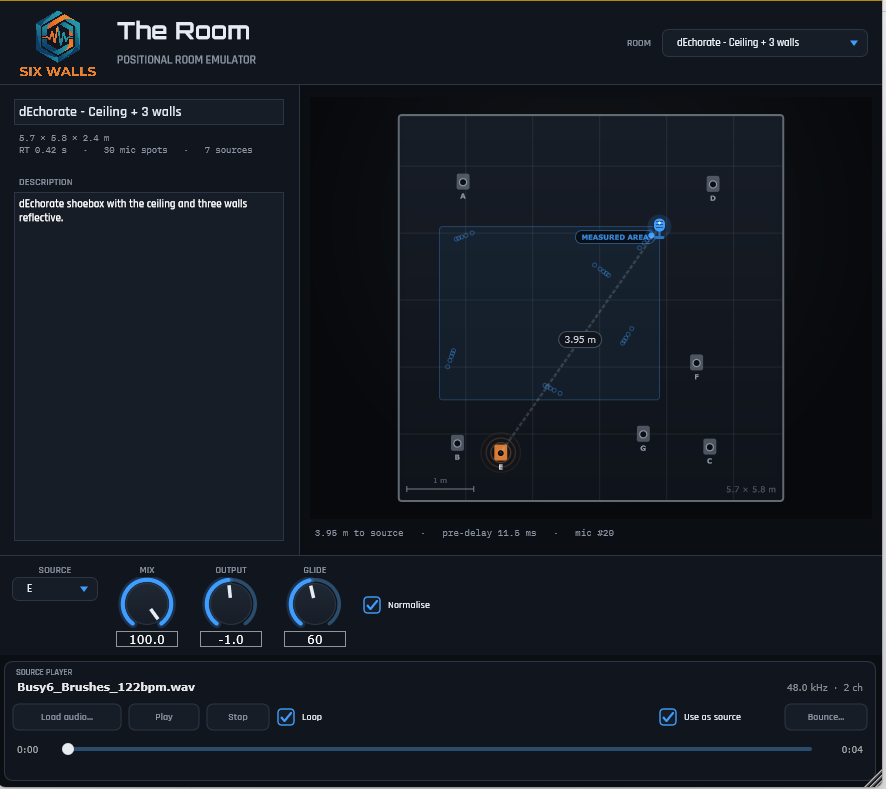
The Room plugin UI: a top-down room view with a draggable microphone puck and source markers, a room selector under the Six Walls logo, a microphone-model selector with an on/off button, an editable room description, and mix / output / glide knobs
Before you download Six Walls is one person building these in his spare time and giving them away.

Windows: the installers are code-signed — verified publisher Edwin Jones. A fresh signing certificate takes a little while to build reputation with SmartScreen, so for the first few weeks you may still see a “not commonly downloaded” note — click More info → Run anyway.

macOS: the .pkg and the bundle .zip are signed with a Developer ID and notarized by Apple, so they open with no Gatekeeper prompt. Universal — Apple silicon and Intel.
Watch It A quick introduction to The Room

A convolution room emulator that lets you move the microphone. Instead of an algorithmic reverb, The Room convolves your signal with a bank of measured room impulse responses and lets you drag a mic around a top-down view of the space — pre-delay, tone, and level all follow the position, the way they do in a real room.

  • Pick a room, drag the mic puck; the nearest measured IR is equal-power crossfaded in.
  • Mic X / Mic Y are automatable — sweep the mic through the room from your DAW.
  • Measured rooms: a small treated room, a stone great hall, a domed octagon, a classroom, and a shoebox with progressively reflective surfaces.

Hear it — a dry studio kit, room off vs. the Great Hall

Through the ’95 Iron Curtain LDC — Low-Cut mic at 27.6% mix, rendered through the plugin itself. Matched for loudness, so you hear the room, not a volume jump.

Room off
Room on
Included Choose your microphone. A MIC selector picks the microphone The Room captures with — twelve models, from vintage broadcast dynamics through to modern large-diaphragm condensers — each with its own voicing layered over the measured room. Or import your own .mic profile.
VST3 AU AAX Windows installer macOS JUCE 8 v1.1.5

Get It! downloads the Six Walls Installer, the easiest way to install The Room, keep it up to date, and hear about new releases. Prefer to install plugins one at a time? Every platform’s installers and zips are under Individual downloads on the Support page, along with the All Rooms add-on. Full manual on the Support page.

Questions about The Room

What is The Room?

A convolution room emulator built around moving the microphone. Pick a measured space, drag the mic around it, and the pre-delay, tone, and level follow, with the nearest measured impulse response crossfaded in as you move.

Can I use my own impulse responses?

Yes. Import IR loads WAV, AIFF, FLAC, Ogg, MP3, Waves .wir, and raw text sample dumps. An imported response gets a Distance control in place of the map, since one capture can't describe the reflections elsewhere in the room. Waves also publishes a large impulse response library for free, and those files import directly.

Can I sweep the mic from my DAW?

Yes. Mic X and Mic Y are automatable, so you can move the mic through the room during a song. Glide sets how smoothly the sound follows when the nearest impulse response changes.

Is it really free, and what formats does it come in?

Free, no account, and no catch. VST3, AU, and AAX for Windows and macOS. The Six Walls Installer is the easiest way to get it and keep it updated, or you can grab individual installers from the Support page.

Disclaimer: Six Walls plugins are provided free of charge on an “as-is” basis — use them at your own risk, and always work on a copy of your session. Any comparison products are named for reference only; Six Walls is not affiliated with or endorsed by them. The Room is built on openly licensed impulse-response datasets — full attribution ships with the plugin.